At a time when websites and applications are multiplying, delivering a smooth and effective digital experience has become a major challenge. Yet two concepts are frequently confused: UX design and UI design. Although closely related, these two disciplines serve distinct and complementary objectives in the creation of a high-performing digital product.
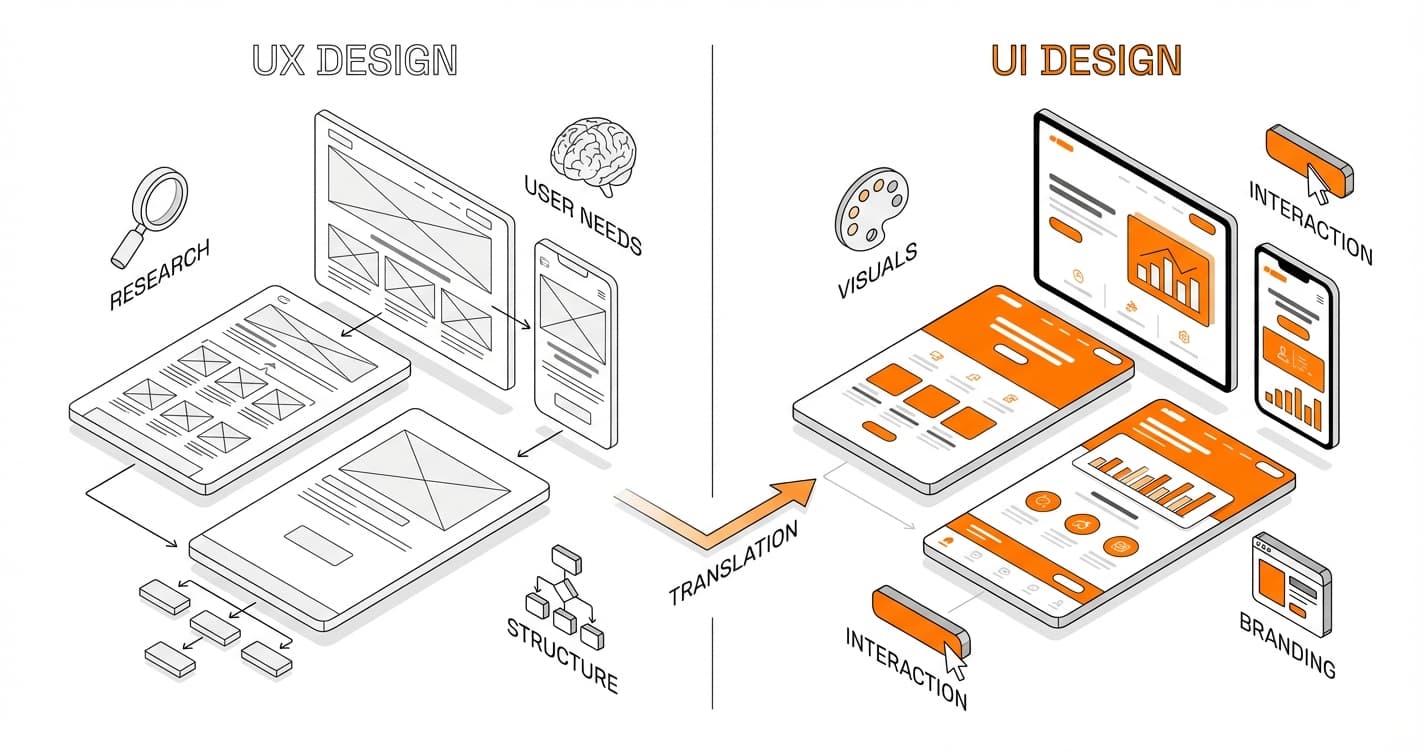
But what is the real difference between UX and UI design? UX (User Experience) focuses on the user’s overall feeling, their journey, their satisfaction, and the ease with which they achieve their goal. UI (User Interface), on the other hand, deals with the visual and interactive aspect of the interface: colors, typography, buttons, and visual hierarchy. Together, they shape the effectiveness, attractiveness, and credibility of a website or application.
Understanding this distinction is essential, whether you are an entrepreneur, a project manager, a designer, a developer, or simply curious about the digital world. Great UX without a polished UI can frustrate users, just as a beautiful interface without UX thinking can harm conversion and engagement.
In this article, we will clearly explain the differences between UX and UI design, their respective roles, their complementarity, and why they are today inseparable in any digital strategy focused on performance and user experience.
What Is UX Design?
UX design, or User Experience Design, refers to the set of methods and thinking aimed at improving the experience a user has when interacting with a digital product: website, mobile application, software, or online platform. Contrary to a common misconception, UX design is not limited to visual appearance. It is primarily concerned with the overall feeling, the smoothness of the journey, and the user’s ability to reach their goal simply and efficiently.
UX design is built on a fundamental principle: a good product is one that is useful, usable, and enjoyable. It is not just about attracting users, but about understanding their real needs, expectations, obstacles, and behaviors in order to design an intuitive experience.
A User-Centered Discipline
At the heart of UX design is the user. Every decision is made with them in mind:
- Who are they?
- What are they trying to do?
- In what context are they using the product?
The UX designer relies on user research (interviews, questionnaires, tests) to identify concrete problems. This approach makes it possible to design interfaces that address real use cases, rather than internal assumptions. Reference organizations such as Nielsen Norman Group have greatly contributed to formalizing these user-centered methods.
The Main Objectives of UX Design
UX design pursues several key objectives, all oriented toward satisfaction and efficiency:
- Reducing friction in the user journey
- Facilitating understanding and navigation
- Improving conversion (purchase, sign-up, contact)
- Building trust and credibility in the product
- Creating a consistent and enjoyable experience
Good UX design allows users to think as little as possible: they instinctively know where to click, what to do, and how to move forward.
The Key Stages of UX Design
UX design relies on a structured methodology. It begins with a user research phase, followed by needs analysis and the creation of personas. This is followed by information architecture design, wireframes, prototypes, and finally user testing. These tests are essential: they identify blocking points before the final production release.
Unlike a fixed approach, UX design is an iterative process. The experience is continuously improved based on real user feedback.
What Is UI Design?
UI design, or User Interface Design, is the discipline of designing the visual and interactive interface of a website, application, or software. Where UX design focuses on the overall experience and user journey, UI design is concerned with what the user actually sees and interacts with: colors, typography, buttons, icons, spacing, animations, and visual hierarchy.
The primary goal of UI design is to make an interface clear, intuitive, consistent, and aesthetically pleasing, in order to facilitate interaction between the user and the digital product. A good interface goes unnoticed: it naturally guides the user, without effort or confusion.
The Central Role of UI Design in a Digital Product
UI design plays a decisive role in the first impression. Within seconds, a user judges the credibility of a website or application through its interface. A cluttered, hard-to-read, or inconsistent design can immediately create distrust, even if the content or functionality is relevant.
Conversely, a polished interface reinforces:
- Immediate understanding of the product
- User trust
- The desire to interact and continue browsing
UI design therefore has a direct impact on engagement, retention, and conversions.
The Key Elements of UI Design
UI design relies on a set of carefully considered visual and interactive components. Among the most important are:
- Typography: font choices, sizes, contrast, and readability
- Colors: consistency with brand identity, accessibility, emotions
- Buttons and calls to action: shapes, sizes, visual hierarchy
- Icons and visuals: clarity, immediate comprehension
- Spacing and grids: structure and reading comfort
- Micro-interactions: subtle animations that confirm an action
All these elements must work together to create a smooth and consistent interface, regardless of the device (desktop, mobile, tablet).
UI Design and Visual Consistency
Good UI design is built on consistency. This often involves establishing a design system, which defines precise rules: official colors, button styles, reusable components, and interactive states. Tools such as Adobe, Figma, or Sketch are widely used to design and maintain these interfaces in a structured way.
This consistency not only saves time during design, but also delivers a homogeneous experience to the user, regardless of their entry point into the product.
UI Design, Accessibility, and Performance
UI design is not limited to aesthetics. It also incorporates accessibility considerations: sufficient contrast, readable text sizes, easily clickable buttons, and clear navigation. An inclusive interface allows a broader audience to use the product without difficulty.
Finally, well-thought-out UI design indirectly contributes to SEO and digital performance. A clear interface improves time spent on the site, reduces bounce rate, and facilitates conversions — all positive signals for search engines.
In summary, UI design consists of giving an effective visual form to the user experience, transforming a functional structure into an attractive, understandable, and engaging interface.