Automating tasks without coding, connecting your tools and saving time: that’s exactly what n8n makes possible. But when you’re just starting out, one question comes up quickly: how do you create a workflow in n8n effectively?
Between nodes, triggers, API connections and conditional logic, getting started can seem complex at first glance. Yet with the right approach, it’s possible to build powerful automations in just a few steps.
In this article, you’ll discover how to create a workflow in n8n step by step, understand its underlying logic and set up your first automations quickly.
What is a workflow in n8n and how does it work?
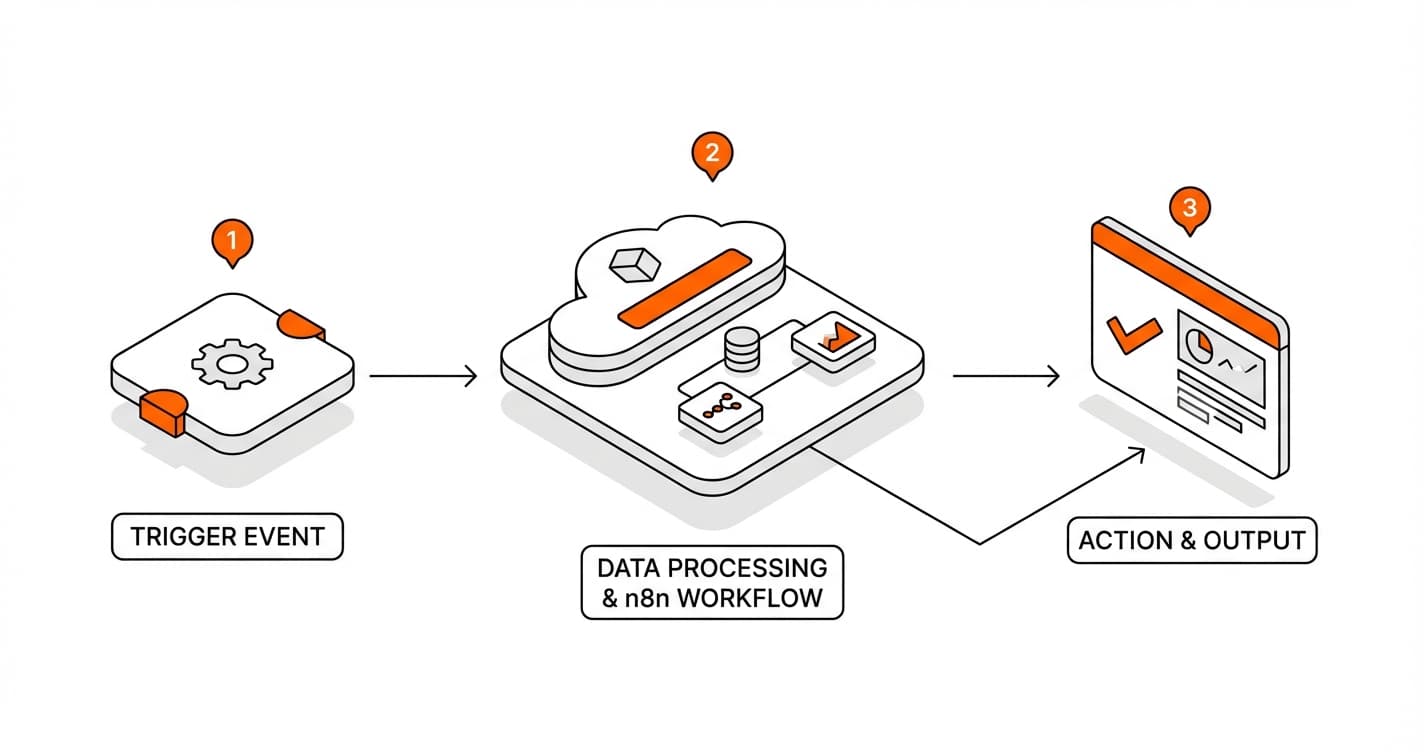
A workflow in n8n is a sequence of automated actions that chain together to execute a task without human intervention. In practice, it’s a logical scenario that connects different tools and moves data automatically between them.
To understand this clearly, imagine you receive an online form submission. Instead of processing each request manually, a workflow can:
retrieve the data
send it to a CRM
trigger an automated email
notify your team
👉 All of this without any action on your part.
That is precisely the role of a workflow in n8n: automating repetitive processes.
An n8n workflow is built on a simple yet powerful structure. It always starts with a trigger. This is the element that kicks off the process. A trigger can be:
an event (e.g. receiving an email)
a user action
a scheduled time
As soon as the trigger fires, the workflow starts.
Next come the nodes. Each node represents a specific action. For example:
sending an email
retrieving data via an API
transforming information
adding a row to a database
Nodes are connected to one another to create a logical flow. Each step depends on the previous one, making it possible to build complex scenarios.
👉 The workflow therefore works like a chain of connected actions.
Another key element is data flow. When a workflow is triggered, data passes from one node to the next. Each node can:
use that data
modify it
enrich it
This makes it possible to build intelligent automations capable of adapting to different scenarios.
n8n also allows you to add conditional logic. For example, you can define rules such as:
if a condition is met → action A
otherwise → action B
👉 This turns a simple workflow into a decision-making system.
One of n8n’s greatest strengths is its flexibility. Unlike other tools, it allows you to create highly customized workflows with connections to numerous services via API.
This means you can automate:
marketing
sales
customer support
internal tasks
👉 The possibilities are virtually unlimited.
n8n’s visual interface also makes it easier to understand. Workflows are displayed as diagrams, giving you a clear view of each step and its connections.
However, behind this apparent simplicity lies a real logic to master. A good workflow must be:
structured
logical
optimized
Without this, it can become difficult to manage or maintain.
Finally, a workflow in n8n can be executed:
in real time
at regular intervals
on demand
This makes it adaptable to a wide range of needs and use cases.
In summary, a workflow in n8n is an automation system built on triggers, actions and logical rules. It connects tools, moves data and executes tasks without human intervention.
How to create your first workflow in n8n step by step?
Creating a workflow in n8n may seem technical at first, but the process is actually logical and approachable. By following a clear method, you can set up your first automation quickly.
Step 1: Create a new workflow
The first step is to access your n8n interface and create a new workflow. Once logged in, click « New Workflow. » This opens a blank canvas where you will build your automation. This step is essential, as it lays the foundation for your logic. You start from a blank slate on which you will connect different elements.
Step 2: Add a trigger
A workflow always starts with a trigger. In n8n, you need to add a « Trigger » node. This trigger can be a specific event, such as receiving a webhook, an email, or a scheduled task. The choice of trigger depends on your needs. It is what automatically starts the workflow as soon as a condition is met.
Step 3: Add a first action
Once the trigger is in place, you need to add an action. This action corresponds to what you want to automate. For example, you can send an email, save data or call an API. In n8n, each action is represented by a node that you connect to the trigger. This step gives your workflow its first concrete objective.
Step 4: Configure the data
Data is at the heart of how a workflow operates. You need to configure each node so that it correctly uses the information it receives. n8n allows you to map data between steps, meaning you can retrieve information from one node and use it in another. This configuration is essential for your automation to work correctly.
Step 5: Add conditions if needed
To make your workflow smarter, you can add conditions. This allows you to create different scenarios depending on the situation. For example, if a value exceeds a certain threshold, you can trigger a specific action. Otherwise, you can follow a different path. This conditional logic allows the workflow to adapt to multiple situations.
Step 6: Test the workflow
Before activating your workflow, it is essential to test it. n8n provides a test function that lets you verify each step. You can check whether data flows correctly and whether actions are executed as expected. This phase helps you identify errors and optimize performance.
Step 7: Activate the workflow
Once testing is complete, you can activate your workflow. From that point on, it runs automatically according to the defined trigger. You no longer need to intervene manually. Your automation is live and ready to save you time.
Summary table of steps
Step
Action
Goal
1
Create a workflow
Set the structure
2
Add a trigger
Start the automation
3
Add an action
Define the outcome
4
Configure the data
Ensure consistency
5
Add conditions
Customize the workflow
6
Test
Verify correct operation
7
Activate
Fully automate
In summary, creating a workflow in n8n follows a simple logic: trigger, process and automate. Once mastered, this approach lets you build powerful automations tailored to your needs.
Free tool
AI Specifications Generator
Create professional project specifications in minutes with our AI-powered tool.
What are the best workflow examples to build with n8n?
One of n8n’s greatest strengths is its ability to automate a wide variety of tasks. Whether you’re an entrepreneur, a marketer or a developer, certain workflows are particularly useful for saving time and boosting productivity.
The first must-have example is automating inbound leads. As soon as a form is filled out on your website, n8n can retrieve the data, send it to your CRM, trigger a welcome email and notify your team. This type of workflow ensures you never miss an opportunity and improves your commercial responsiveness.
Another highly powerful workflow involves email management. You can automate the sorting of incoming emails, classify them according to specific criteria, or trigger automatic replies. For example, an email containing certain keywords can be redirected to a specific folder or forwarded to a colleague.
In the marketing space, n8n is particularly effective for automating content publishing. You can schedule the publication of blog posts, social media updates or newsletters. A single workflow can orchestrate your entire distribution strategy, saving you a considerable amount of time.
Data synchronization between tools is also a very common use case. For example, you can connect your project management tool with your CRM or database. Whenever information is updated in one tool, it is automatically updated in the others. This eliminates errors and ensures data consistency.
Another interesting example is automating customer support. When a ticket is created, n8n can:
log it in a management tool
send a confirmation to the customer
notify the relevant team
This improves the customer experience while reducing the workload.
n8n is also very useful for automated monitoring. You can create a workflow that watches specific sources (websites, RSS feeds, social media) and sends you alerts whenever new content is published. This keeps you informed without any effort.
In an e-commerce context, it is possible to automate order management. For example, as soon as an order is placed, the workflow can:
update stock levels
send a confirmation email
generate an invoice
notify the logistics team
This streamlines the entire process.
Workflows related to data and reporting are also highly valuable. You can automate the collection of data from multiple sources, analyze it and generate regular reports. These reports can then be automatically sent to your team.
Another advanced use case is integration with artificial intelligence tools. For example, you can connect n8n to an AI to:
generate content
analyze data
automate responses
This opens up very powerful possibilities.
Finally, n8n can be used to automate internal tasks, such as human resources management or project tracking. For example, when a new team member joins, a workflow can create their access credentials, send onboarding documents and schedule their first tasks.
In summary, the best workflows to build with n8n are those that automate repetitive, low-value tasks. The more you identify these tasks, the more time you save and the more efficient you become.
What mistakes should you avoid when creating a workflow in n8n?
Creating a workflow in n8n may seem straightforward, but certain mistakes can quickly make your automations ineffective, unstable or difficult to maintain. To get the most out of n8n, it’s essential to avoid these pitfalls from the start.
The first mistake is not clearly defining the workflow’s objective. Many users start connecting nodes without a precise vision of the expected outcome. The result: a confusing workflow that is hard to understand and often ineffective. Before you begin, it’s crucial to define a clear logic — what problem you want to solve, what data you’re working with and what result you expect.
Another common mistake is building workflows that are too complex from the start. Trying to automate too many things at once can make the system fragile. The more complex a workflow, the harder it is to maintain and fix. It’s better to start with simple automations and improve them gradually.
Poor data management is also a frequent issue. In n8n, data flows between nodes, and a misconfiguration can cause errors. For example, using the wrong field or failing to validate incoming data can break the entire workflow. It’s therefore essential to understand data mapping thoroughly and to test each step.
Not testing your workflow is a critical mistake. Many users activate their automation without verifying how it works. This can lead to bugs, incorrect data or unintended actions. Testing ensures that every step works correctly before going live.
Another important mistake is the lack of error handling. A workflow can fail for various reasons: API issues, missing data, unavailable services. Without error handling, the workflow stops abruptly. n8n allows you to add mechanisms to manage these situations, such as notifications or alternative paths.
Over-reliance on a single tool can also cause problems. If your workflow depends entirely on an external service and that service experiences an issue, your entire automation is affected. It’s therefore advisable to plan for alternatives or fallback solutions.
Another trap is not documenting your workflows. Over time, you may forget the logic you put in place, especially if the workflow is complex. Adding notes or clearly structuring the steps makes future maintenance and modifications much easier.
Poor node organization is also a frequent mistake. A disorganized workflow becomes difficult to read and understand. It’s important to structure steps visually, use clear names and maintain consistent logic throughout.
Failing to optimize performance can also be problematic. Some workflows execute unnecessary or repetitive actions, which slows the system down. It’s important to streamline steps to avoid unnecessary processing.
Finally, an often underestimated mistake is not monitoring your workflows after activation. An automation may work correctly at first, then run into issues over time. It’s therefore essential to track its performance and make adjustments as needed.
In summary, avoiding these mistakes leads to workflows that are more reliable, more performant and easier to maintain. A good workflow in n8n is built on clear logic, rigorous testing and a well-thought-out structure.
What is a workflow in n8n?
A workflow in n8n is a sequence of automated actions triggered by an event. It connects multiple tools and executes tasks without human intervention.
Is n8n accessible to beginners?
Yes, n8n is accessible to beginners thanks to its visual interface. However, a basic understanding of data and conditional logic is recommended to build effective workflows.
Do you need to know how to code to use n8n?
No, n8n is a no-code/low-code tool. You can create automations without writing any code. However, some advanced features may require technical knowledge.
What types of workflows can you create with n8n?
You can automate many processes: email management, lead generation, content publishing, data synchronization and customer support automation, among others.
How do you trigger a workflow in n8n?
A workflow can be triggered by various elements: a webhook, an email, a user action or a schedule (cron). The trigger depends on your specific need.
Can n8n be connected to other tools?
Yes, n8n allows you to connect many services through native integrations or APIs. This enables you to centralize and automate your toolstack.
How do you test a workflow before activating it?
n8n provides a test mode that lets you verify each step. You can inspect the data and confirm that actions are executed correctly before going live.
What should you do if a workflow isn’t working?
Check the data, the connections between nodes and the settings of each step. Adding logs and running tests helps you identify the issue quickly.
Can you modify a workflow after activating it?
Yes, you can modify a workflow at any time. It is however recommended to deactivate it temporarily to avoid errors during modifications.
Is n8n free?
n8n offers a free open-source version that you can self-host, as well as a paid cloud version with additional features.